Checking the network connection to the server
Checking whether the Cloud server can be reached
Section titled “Checking whether the Cloud server can be reached”At the start of the installation, it must be checked whether the Urban Cloud server can be reached over the internet. The color of the circular status indicator (digit ➀) to the left of the top list entry Connection to server on the installation screen provides this information:
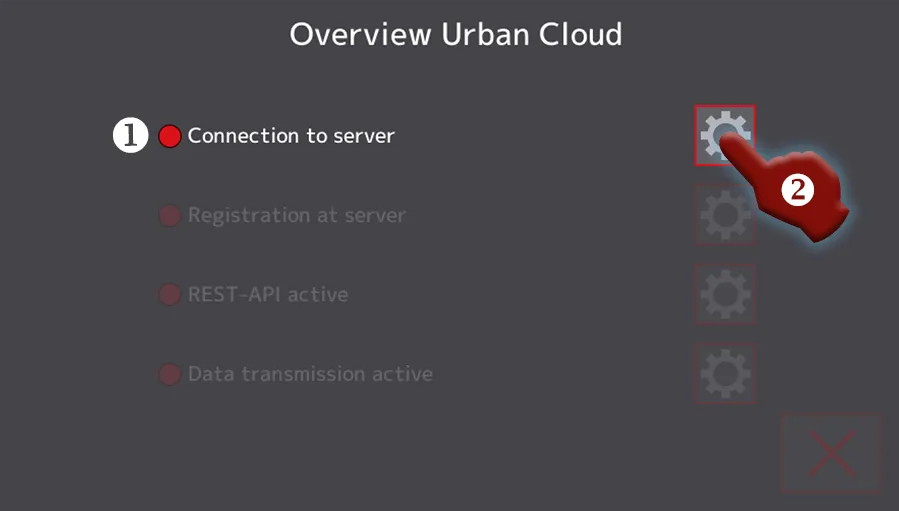
Screenshot 1: Cloud setup, status of the Cloud server’s reachability
- If the status indicator ➀ green lights up, the Cloud server can be reached. Everything is fine, and you can continue with the next installation step, registering the terminal.
- If the status indicator lights up red, the Cloud server cannot be reached, and action is required. Tap the button (digit ➁) to the right of the list entry in order to switch to a detail screen (Screenshot 2) whose contents will help you troubleshoot.
Checking the reachability of network components
Section titled “Checking the reachability of network components”The following screenshot shows whether the Urban network router ➀, the internet ➁ and finally the Urban Cloud server (digit ➂) can each be reached in turn:
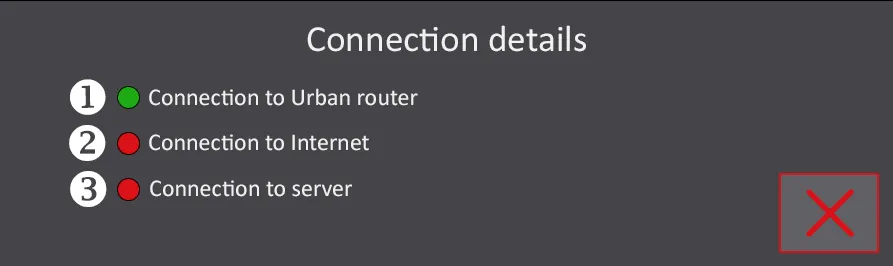
Screenshot 2: Alma Pro, Cloud setup, details on the Cloud server’s reachability
- A green status indicator signals that the component can be reached; a red status indicator signals that it cannot be reached. Use the listed details for your troubleshooting.
- Make sure, one after another, through appropriate cabling and function tests of the network components, that all three status indicators light up green.
- Once all three status indicators light up green, you have successfully resolved the connection problem and can continue with the next step,
Registering the terminal.